
If you are sitting with a business case that compares multiple technology options and you need to produce a recommendation, the first thing you need is a set of solution assessment criteria. Not a gut feel, not a preferred vendor, and not a consensus vote from a steering committee. A structured, weighted scoring model that you can stand behind when someone challenges your recommendation. And they will challenge it. Let me show you how to build one.
Why a Structured Scoring Approach Matters
In my experience, the moment a business case includes more than two options, stakeholders start to advocate for their preferred solution early. Without predefined criteria agreed upfront, the evaluation process becomes a negotiation rather than an analysis. I have seen project sponsors discount a perfectly viable solution because they had a prior relationship with a competing vendor, and I have seen technical teams favour a custom build because it kept work in-house. A scoring model does not eliminate politics, but it makes the final recommendation traceable and difficult to dismiss without engaging with the evidence.
For more on how to structure the broader business case document, the Business Case Template article covers the full structure you will need around this analysis.
The Four Broad Options You Are Usually Comparing
Most technology business cases I have worked on collapse into four broad implementation approaches, even when the specific solutions within each category vary considerably.
- Do Nothing: Maintain the current state with existing systems and processes. This is always worth scoring because it establishes a baseline and sometimes, uncomfortably, it wins.
- Utilise Existing Investment: Extend or repurpose technology already licensed or deployed within the organisation. There may be several candidates here, and each needs to be assessed individually.
- Purchase a Solution: Acquire a commercially available product from a vendor. Again, multiple products may be in scope and each one gets its own column in the matrix.
- Custom Build: Develop a bespoke solution from scratch. This typically carries the highest implementation risk and cost, but it is sometimes the only viable path when no commercial product covers the requirements adequately.
Within Options 2 and 3, and sometimes Option 4, you may be assessing several specific technology products. The scoring model accommodates this by giving each a separate column in the decision matrix.
Defining Your Solution Assessment Criteria
The criteria need to be agreed with key stakeholders before any scoring begins. If you define them after you have already reviewed the options, people will assume, rightly, that the criteria were chosen to favour a particular outcome. I always run a short working session with the project sponsor, a technical lead, and at least one operational representative to lock these in. The five criteria I use most consistently are set out in the comparison table below.
| Criterion | What It Measures | Score Range | Notes |
|---|---|---|---|
| Requirements Coverage | How well the solution meets documented business and technical requirements | 2 to 6 (double-weighted) | Typically weighted at twice the value of other criteria |
| Contract Value | Estimated total cost for purchase and implementation over two years | 1 to 3 | Uses indicative vendor pricing or internal estimates |
| Implementation Timeframe | Time from acquisition to go-live | 1 to 3 | Affected heavily by the configuration and customisation load |
| Ongoing Cost | Annual software support and maintenance expense | 1 to 3 | Includes perceived complexity and specialist support dependency |
| Risk | Aggregate risk exposure across timeframe, cost, requirements, and change readiness | 1 to 3 (derived from risk matrix) | Based on the organisation’s endorsed risk severity framework |
How to Score Each Criterion
Requirements Coverage
This is the most important criterion in almost every evaluation I have run. The scoring starts by checking each identified solution against your documented requirements using the following classification codes:
- SUP (Supported): The requirement is met by out-of-the-box functionality with no additional work required.
- CFG (Configurable): The requirement is met through a functional component that needs configuration time.
- CST (Customisation Required): The requirement is not supported by default and needs custom development.
- FUT (Future Inclusion): The requirement is not currently available but is on the vendor’s product roadmap.
- NS (Not Supported): The requirement is not and will not be supported by the product.
- 3RD (Third Party): The requirement is met via integration with a third-party product.
You then translate that coverage assessment into a score for each solution, and because requirements coverage directly reflects whether the solution will actually work, I double the weight of this criterion in the final matrix.
- Score 6: All requirements are met by the solution.
- Score 4: Requirements are partially met.
- Score 2: Requirements are not met by the solution.
If you have not yet completed a thorough requirements gathering phase, this scoring will be less reliable. The Requirements Prioritisation article is worth reading alongside this one, particularly if your requirements list is still being finalised.
Contract Value
Using indicative costs from vendors or internal project estimates, score each option based on the estimated total cost for year one and year two of purchase and implementation.
- Score 3: Low cost, under $550,000 (within the preferred budget constraint).
- Score 2: Medium cost, between $550,000 and $1.1m.
- Score 1: High cost, over $1.1m.
Implementation Timeframe
Score each option based on realistic time from contract signature to go-live. The amount of configuration and custom development required will be the primary driver of this estimate.
- Score 3: Short timeframe, under 6 months.
- Score 2: Medium timeframe, 6 to 9 months.
- Score 1: Long timeframe, 9 to 12 months.
Ongoing Cost
Rate the annual ongoing cost based on software support fees and the complexity of maintaining the system, which affects the level of specialist expertise required.
- Score 3: Low ongoing cost, under $50,000 per annum.
- Score 2: Medium ongoing cost, $50,000 to $100,000 per annum.
- Score 1: High ongoing cost, over $100,000 per annum.
Risk
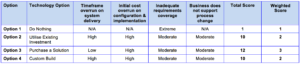
Assess each solution against four specific risks that consistently affect technology implementations: timeframe overrun on delivery, initial cost overrun on configuration and implementation, inadequate requirements coverage, and the business not supporting the process change required. Use your organisation’s endorsed risk severity matrix to assign a rating to each risk for each option.
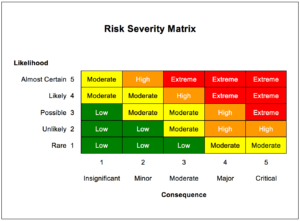
Convert each severity rating to a numeric score: Low = 4, Moderate = 3, High = 2, Extreme = 1. Sum the four scores to produce a total risk score, then convert to a weighted score for the matrix.
- Weighted Score 3: Total risk score between 12 and 16.
- Weighted Score 2: Total risk score between 8 and 11.
- Weighted Score 1: Total risk score under 8.
A Worked Example: When the Preferred Option Was Not the Obvious One
On Project X, a mid-sized public sector organisation was assessing four options for replacing a legacy case management system. The steering committee had a clear favourite: a commercial product that had already been deployed in a neighbouring agency. There was political pressure to follow suit and reduce procurement risk. I was brought in to lead the BA workstream and produce the business case recommendation.
When I ran the requirements coverage assessment, the “preferred” commercial product scored only a 4 on the double-weighted requirements coverage criterion because roughly a third of the organisation’s documented requirements needed customisation that the vendor had not scoped. A second commercial product, which had not been on the steering committee’s radar, scored a 6 on requirements coverage, a 3 on contract value, and a 2 on risk, giving it a substantially higher total score in the decision matrix.
The friction came when I presented the matrix. The project sponsor pushed back immediately, arguing that the requirements coverage gap in the preferred product was “manageable” and that the procurement risk of choosing an unfamiliar vendor was not adequately reflected in the model. I held the position on requirements coverage because the classification work was documented and traceable: I could show exactly which requirements were marked CST and FUT against the preferred product and exactly how many there were. I did agree to revisit the risk criterion and add a fifth risk factor specifically for vendor experience within the sector, which modestly improved the preferred product’s risk score but did not change the final ranking. The second commercial product remained the highest scorer and was formally recommended. It was approved.
The reason the model held up under pressure was not that it was mathematically perfect. It was because the criteria had been agreed with stakeholders before the scoring began, and every score was traceable to documented evidence.
Building the Final Decision Matrix
Once all criteria are scored for every option, you compile them into a single decision matrix. Each row represents a criterion, each column represents a solution option, and the cells contain the weighted scores. You sum the column totals, and the highest total score indicates the recommended option. The matrix provides the traceability that turns a recommendation into a justified decision rather than an opinion.
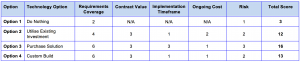
For each solution option, make sure the scoring notes are captured alongside the matrix so that any reviewer can trace a score back to the underlying evidence. This matters enormously if the recommendation is later questioned during governance review. You can see how this feeds into the broader Business Case Analysis process, where the decision matrix typically forms the centrepiece of the options analysis section.
The most reliable business cases I have produced over the years have not been the ones where every stakeholder agreed with the outcome. They have been the ones where even the people who disagreed with the recommendation could see exactly how the conclusion was reached. A well-constructed solution assessment criteria framework does not guarantee consensus, but it makes disagreement a matter of evidence rather than preference, and that is a significantly better position to be in when you are standing in front of a governance board defending your work.
Frequently asked questions
What are solution assessment criteria in a business case?
Solution assessment criteria are predefined, weighted factors used to score and rank implementation options in a business case. They typically cover areas such as requirements coverage, cost, timeframe, and risk. Defining them before evaluating options ensures the comparison is objective and traceable.
How do you weight solution assessment criteria?
Weighting is agreed with key stakeholders before scoring begins, based on what matters most to the organisation. Requirements coverage is often double-weighted because it directly reflects whether a solution will actually meet business needs. Other criteria such as contract value, timeframe, ongoing cost, and risk are typically weighted equally.
What should be included in a decision matrix for a business case?
A decision matrix should include each assessment criterion as a row, each solution option as a column, and the weighted scores in the cells. The column totals are summed to identify the highest-scoring option, which forms the basis of the recommendation. Supporting notes should be captured alongside the matrix so every score is traceable to documented evidence.
How do you assess requirements coverage for a technology solution?
You check each documented requirement against the solution using a classification code: Supported, Configurable, Customisation Required, Future Inclusion, Not Supported, or Third Party. You then translate the overall coverage profile into a score, typically 2, 4, or 6 when double-weighted. This gives a clear, evidence-based view of how well each solution meets the organisation’s needs.
How do you score risk in a solution assessment?
Identify the key risk categories relevant to the implementation, such as timeframe overrun, cost overrun, requirements gaps, and change readiness. Use the organisation’s risk severity matrix to rate each risk as Low, Moderate, High, or Extreme, then convert those ratings to numeric scores and sum them. The total is then banded into a weighted score of 1, 2, or 3 for inclusion in the decision matrix.
Try Ash, Your Virtual BA
If you are in the middle of a business case and need to work through your solution options systematically, Ash can help you build out your assessment criteria, structure your scoring approach, and sense-check your decision matrix logic before you present to stakeholders. It is the kind of support that used to require a senior BA looking over your shoulder. Try Ash Virtual BA and get your recommendation on solid ground.
Further reading
- F) Solution Evaluation | The International Institute of Business Analysis™
- Technique Summary: BABOK 10.1, 10.2, and Agile 7.1 | IIBA
Written by Sam Cordes, founder of the Business Analyst’s Toolkit.